Cybersecurity / 13 min read
Transport Layer Security
Transport Layer Security, usually called TLS, protects information as it travels between applications and the systems connecting to them, including browsers accessing websites over HTTPS.
Introduction
Transport Layer Security, usually called TLS, protects information as it travels between applications and the systems connecting to them, including browsers accessing websites over HTTPS.
Although this article focuses on web applications, many of the same principles apply to other services that use TLS.
A properly configured TLS connection provides three main protections.
Confidentiality
Encryption prevents someone monitoring the connection from reading the information being exchanged.
Integrity
TLS helps detect changes to traffic during transmission, protecting against attempts to alter messages, although preventing repeated application requests also requires attention to how the application handles them.
Authentication
TLS allows the client to verify the identity of the server it connects to, while verifying the client’s identity requires an additional mechanism such as client certificates.
Understanding SSL and TLS
Secure Sockets Layer, known as SSL, was the original protocol used to encrypt HTTP connections and provide HTTPS.
SSL versions 2 and 3 both contain serious security weaknesses and should remain disabled.
TLS succeeded SSL, beginning with version 1.0 and later progressing through versions 1.1, 1.2 and 1.3.
People still use the term SSL when discussing certificates or encrypted connections, even when the actual protocol in use is TLS.
This article uses TLS unless it specifically refers to the older SSL protocols.
Server Configuration
Enable Strong Protocol Versions
Web applications should use TLS 1.3 by default and support TLS 1.2 where compatibility requires it.
TLS 1.0 and 1.1 were formally deprecated through RFC 8996 in March 2021 and should be disabled, along with SSL versions 2 and 3.
The supplied guidance also identifies these older TLS versions as unacceptable under PCI DSS and NIST SP 800 52 Revision 2.
If a business must support obsolete clients, place them on a separate endpoint with restricted access and no sensitive information.
Support the TLS_FALLBACK_SCSV mechanism where applicable to help prevent attempts to force a connection onto an older protocol version.
Choose Strong Cipher Suites
Cipher suites determine the cryptographic methods used to protect a TLS connection, and their security varies considerably.
For TLS 1.3, use the standard suites that provide authenticated encryption, including AES GCM and ChaCha20 Poly1305.
Where TLS 1.2 remains necessary, prefer authenticated encryption with ECDHE key exchange and avoid suites that use CBC mode.
Disable null encryption, anonymous authentication and export cipher suites.
Also disable RSA key transport and static Diffie Hellman key agreement because they do not provide forward secrecy.
Forward secrecy protects previously recorded connections from being decrypted merely because the server’s private key is compromised later.
Although ephemeral Diffie Hellman can provide this protection, RFC 9325 discourages finite field DHE suites in TLS 1.2 because of weaknesses involving their construction and parameter negotiation.
Mozilla provides a server configuration generator that can help administrators choose settings suited to their software and compatibility requirements.
Configure Suitable Key Exchange Groups
Older approaches to generating Diffie Hellman parameters created practical problems, including limited client control over the server’s choices and exposure to attacks that could exhaust server resources.
The supported_groups extension allows clients and servers to negotiate supported groups.
Finite field groups defined in RFC 7919 include ffdhe2048, ffdhe3072, ffdhe4096, ffdhe6144 and ffdhe8192.
Elliptic curve options include x25519, prime256v1, x448 and secp384r1.
The supplied configuration examples also include X25519MLKEM768, a hybrid group combining conventional key exchange with protection intended to address quantum computing threats.
Check the cryptographic library used by the server before adding this group, since the examples require OpenSSL 3.5 or later for ML KEM support.
Older versions may reject an Apache or NGINX configuration containing an unsupported group, while an unsupported groups setting in openssl.cnf may be ignored.
Check the relevant version using openssl version or inspect the NGINX build using nginx -V.
An OpenSSL configuration can specify the groups as follows.
openssl_conf = openssl_init

[openssl_init]
ssl_conf = ssl_module

[ssl_module]
system_default = tls_system_default

[tls_system_default]
Groups = X25519MLKEM768:x25519:prime256v1:x448:ffdhe2048:ffdhe3072
For Apache, the equivalent setting can look like this.
SSLOpenSSLConfCmd Curves X25519MLKEM768:X25519:prime256v1:secp384r1For NGINX, the setting can be written as follows.
ssl_ecdh_curve X25519MLKEM768:X25519:prime256v1:secp384r1;Remove unsupported groups when using older libraries and avoid custom Diffie Hellman parameter configuration for TLS 1.2 or earlier.
Disable TLS Compression
TLS compression can expose sensitive information through attacks such as CRIME, which may allow an attacker to recover values including session cookies.
Disable this feature in protocol versions that support it.
TLS 1.3 does not offer TLS compression.
Handle TLS 1.3 Early Data Carefully
TLS 1.3 allows a client resuming a session to send application data before the handshake finishes, a feature called early data or 0-RTT.
This can reduce latency, but early data does not receive the same protection against replay across connections as ordinary application traffic.
An attacker who captures an early request may be able to send it again, potentially causing an operation to run more than once.
Leave early data disabled unless its performance benefit is needed, as NGINX does by default with its ssl_early_data setting.
Clients generally restrict early data to safe methods such as GET unless they have additional knowledge about the application.
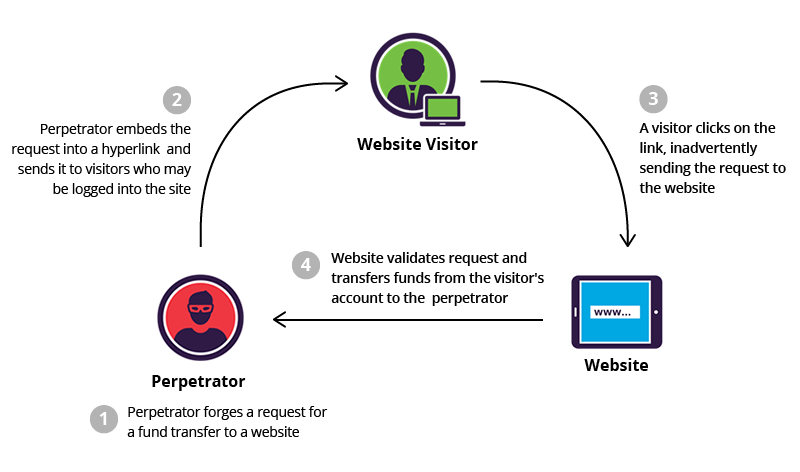
The application must therefore ensure that these methods do not change state, since a GET request that logs someone out or confirms an action can still cause harm when repeated.
Reject early requests that cannot safely be replayed with HTTP status 425 Too Early, allowing the client to retry once the handshake completes.
Where a proxy or content delivery network terminates TLS, make sure it communicates the early data status to the application using the appropriate header.
Early-Data: 1These measures address early data replay, while repeated requests sent after a completed handshake still require application controls such as idempotency keys.
Keep Cryptographic Libraries Updated
Secure protocol settings cannot compensate for vulnerabilities in the libraries implementing them.
Heartbleed is a well known example of an implementation flaw that affected systems using otherwise legitimate encryption protocols.
Keep cryptographic libraries maintained and install relevant security patches.
Test the Configuration
After configuring the server, test its actual behaviour to confirm that the intended protections are in place.
The OWASP Web Security Testing Guide provides guidance on reviewing SSL and TLS deployments.
Online assessment services listed in the supplied material include SSL Labs Server Test, CryptCheck, Hardenize, ImmuniWeb, Mozilla Observatory, Scanigma, Stellastra and OWASP PurpleTeam cloud.
Tools that can be run locally include O Saft, CipherScan, CryptoLyzer, SSLScan, SSLyze, testssl.sh, tls-scan and OWASP PurpleTeam local.
Certificates
Use Strong Private Keys
Choose a private key with sufficient strength for the period during which the key and its certificate will remain in use.
For RSA keys, the supplied guidance specifies a minimum size of 2048 bits.
NIST SP 800 57 provides further information about key lifetimes and equivalent levels of cryptographic strength.
Protect private keys with suitable filesystem permissions and administrative controls so that only authorised systems and people can access them.
Use Strong Certificate Signatures
Use certificates signed with strong hashing algorithms such as SHA 256.
Avoid MD5 and SHA 1 because their cryptographic weaknesses make them unsuitable for modern certificate security.
Match Certificates to the Correct Names
A certificate must cover the fully qualified domain name used to reach the server.
Older systems relied on the certificate’s Common Name field, while modern hostname verification relies on the Subject Alternative Name field.
Include every required hostname in the Subject Alternative Name extension, including the www version where users need to access it.
Where needed for compatibility, the primary hostname can also appear in the Common Name field.
Avoid unqualified names and internal domain names in certificates intended for public services.
For a service reached by a domain name, request a certificate for that name rather than adding unrelated IP addresses.
Where internal and external access use different names or trust arrangements, consider separate certificates.
Assess Wildcard Certificates Carefully
A wildcard certificate can cover multiple matching subdomains, which makes deployment convenient but increases the scope of a private key compromise.
For example, a certificate for *.example.org can serve matching hosts beneath that domain.
If several systems share the certificate and private key, each additional copy becomes another place where the key could be exposed.
Use wildcard certificates where there is a clear operational need and consider automated individual certificate issuance through ACME as an alternative.
Avoid sharing a wildcard private key between systems with different trust levels.
Multiple instances of the same application or similarly trusted VPN gateways may have a reason to share a certificate.
A public web server and an internal server, or a public web server and a VPN gateway, should not share one merely for convenience.
A reverse proxy that terminates TLS can reduce the number of systems holding the wildcard private key.
Keep an inventory of every system using a shared certificate so that renewal or emergency replacement reaches all affected services.
Limit the certificate’s scope where possible by using a narrower subdomain such as *.foo.example.org or a separate domain.
Choose a Suitable Certificate Authority
Public applications need certificates issued by an authority trusted by the browsers and operating systems their users rely on.
Let’s Encrypt provides free certificates that validate control of a domain, so assess what additional benefit a paid certificate would provide before purchasing one.
Internal applications can use an internal certificate authority where the organisation controls the devices and their trust settings.
This can avoid exposing internal hostnames through public certificate issuance and certificate transparency records.
Devices must trust the internal authority before they will accept certificates it issues.
Restrict Issuance With CAA Records
Certification Authority Authorization records allow a domain owner to specify which certificate authorities may issue certificates for the domain.
An authority checking these records should refuse issuance when the records do not authorise it.
CAA records can reduce the opportunity for unauthorised issuance and help organisations control which providers their teams use.
They can also express separate restrictions on wildcard certificate issuance.
Understand Certificate Validation Types
Certificate validation describes the checks an authority performs before issuing a certificate.
Domain Validation confirms control of the requested domain or endpoint, usually through a challenge involving DNS, an approved email method or a resource served by the endpoint.
Organization Validation adds checks on the organisation requesting the certificate and includes verified organisation information in the certificate.
Extended Validation requires further identity checks under the applicable validation rules.
The CA/Browser Forum establishes requirements for these validation processes.
Browsers historically gave Extended Validation certificates a more prominent display, sometimes showing an organisation name or a green indicator in the address bar.
Major browsers moved away from this treatment, so organisations should not expect an Extended Validation certificate to produce a special browser display.
These validation levels do not provide different strengths of traffic encryption.
An attacker who gains enough control over a domain to obtain an accepted certificate may still impersonate that domain without obtaining the same validation type as its legitimate operator.
Consider the operational work involved in obtaining and renewing Organization Validation or Extended Validation certificates, including whether additional checks could delay renewal and affect availability.
Application Configuration
Protect Every Page With HTTPS
Use HTTPS throughout the application, including pages that do not appear to contain sensitive information.
An unprotected page can expose session information or allow an attacker to modify the response and inject malicious code.
Public websites may accept HTTP connections on port 80 and immediately redirect visitors to HTTPS using a permanent redirect such as HTTP 301.
Support this with HTTP Strict Transport Security so that browsers use HTTPS for later connections.
Endpoints used exclusively by APIs should disable HTTP where possible.
If an API must accept connections on an HTTP listener, reject unencrypted requests instead of relying on a redirect after sensitive information may already have been transmitted.
Avoid Mixed Content
A page served over HTTPS should also retrieve its scripts, stylesheets and other resources over HTTPS.
Resources loaded through HTTP can be intercepted or modified, undermining the protection of the surrounding page.
Modern browsers block many forms of active mixed content, but applications should provide secure resource URLs themselves.
Protect Cookies
Set the Secure attribute on cookies so that browsers send them only over HTTPS.
This remains relevant even when the legitimate server does not provide an HTTP service, since an attacker may attempt to draw the browser into an unencrypted request.
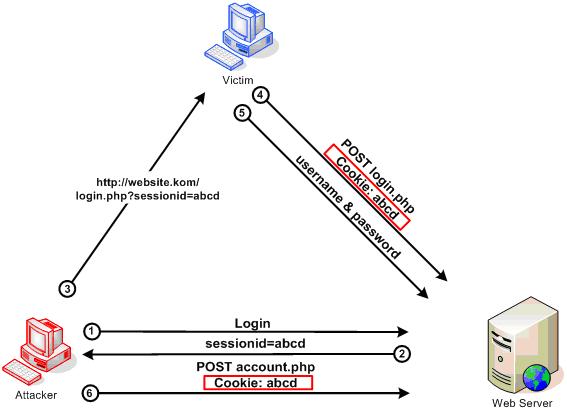
Where supported, use the __Secure- cookie name prefix to require secure cookie creation and help prevent attempts to overwrite the cookie through HTTP.
Such protection can help address cookie manipulation associated with session fixation.
Prevent Storage of Sensitive Responses
TLS protects information during transmission, but it does not prevent the receiving browser or a proxy that decrypts traffic from storing it.
For responses containing sensitive information, instruct HTTP caches not to retain the response.
Cache-Control: no-storeThe no-store directive applies to both private and shared HTTP caches.
Older combinations involving no-cache, must-revalidate, Pragma and Expires are generally unnecessary for modern clients when no-store is present.
HTTP cache controls do not determine whether a browser stores cookies, since cookie storage and lifetime depend on cookie attributes.
Where signing out should also clear existing browser data, consider the appropriate Clear-Site-Data response header.
Clear-Site-Data: "cache", "cookies", "storage"Choose these directives with care because clearing cookies and storage can affect other application data associated with the site.
Enable HTTP Strict Transport Security
HTTP Strict Transport Security, usually shortened to HSTS, tells a browser to use HTTPS for a site.
While an HSTS policy applies, the browser also prevents users from bypassing certificate errors.
Plan its deployment carefully using the guidance in the OWASP HTTP Strict Transport Security Cheat Sheet.
Client Certificates and Mutual TLS
A typical TLS connection verifies the server’s identity, while mutual TLS also requires the client to present a certificate and prove possession of its private key.
In TLS 1.3, the client’s proof is tied to the handshake through the CertificateVerify message.
This prevents an intermediary from simply transferring that proof to a separate TLS connection with the legitimate server.
Mutual TLS does not remove the need to verify the server properly.
If a client accepts an attacker’s certificate for the intended domain, information sent to that TLS endpoint can be read by the attacker even when the client also uses a certificate.
Review server identity validation and trust settings independently from client authentication.
Practical Considerations
Client certificates introduce work around issuance, installation, renewal and revocation.
People without technical experience may find installation difficult, while organisational systems that decrypt TLS traffic can interfere with mutual TLS authentication.
These challenges make client certificates less common on public websites.
They can still be suitable for sensitive applications and APIs, particularly when devices and users belong to the same organisation or have the technical support needed to manage them.
Public Key Pinning
Public key pinning allows a client to check that a server presents an expected public key in addition to passing ordinary certificate validation.
This can provide protection where an attacker obtains an otherwise trusted certificate through a compromised authority or a weakness in certificate issuance.
The protection depends on the integrity of the client and its pinning configuration.
Browsers once supported HTTP Public Key Pinning, known as HPKP, but operational and security problems led to its deprecation.
Do not rely on HPKP for modern browser applications.
Pinning may still be relevant for mobile applications, desktop software and communication between servers, where the application controls certificate verification and can manage key changes safely.
The OWASP Pinning Cheat Sheet discusses these uses in more detail.
References
OWASP Transport Layer Security Cheat Sheet
Mozilla Server Side TLS guidance
NIST SP 800 52 Revision 2, Guidelines for the Selection, Configuration, and Use of Transport Layer Security Implementations
NIST SP 800 57, Recommendation for Key Management
RFC 8996, Deprecating TLS 1.0 and TLS 1.1
RFC 9325, Recommendations for Secure Use of TLS and DTLS
RFC 7919, Negotiated Finite Field Diffie Hellman Ephemeral Parameters for TLS
RFC 8446, The Transport Layer Security Protocol Version 1.3
RFC 8470, Using Early Data in HTTP